Webhooks
Cobrofácil can send HTTP POST requests to your application when supported events happen in your account. Webhooks are configured in the Cobrofácil app and are delivered as JSON payloads to the URL you provide.
Create a webhook
You can add webhook endpoints in the Cobrofácil app. Each webhook should point to an endpoint in your system that can receive Cobrofácil event notifications.
During development, you can use an external inspection service such as webhook.site to receive and inspect webhook payloads before connecting your production endpoint.
After adding a webhook, use the Enviar evento de prueba test action to send a webhook ping. This helps confirm that Cobrofácil can reach your endpoint and that your system is receiving requests correctly.
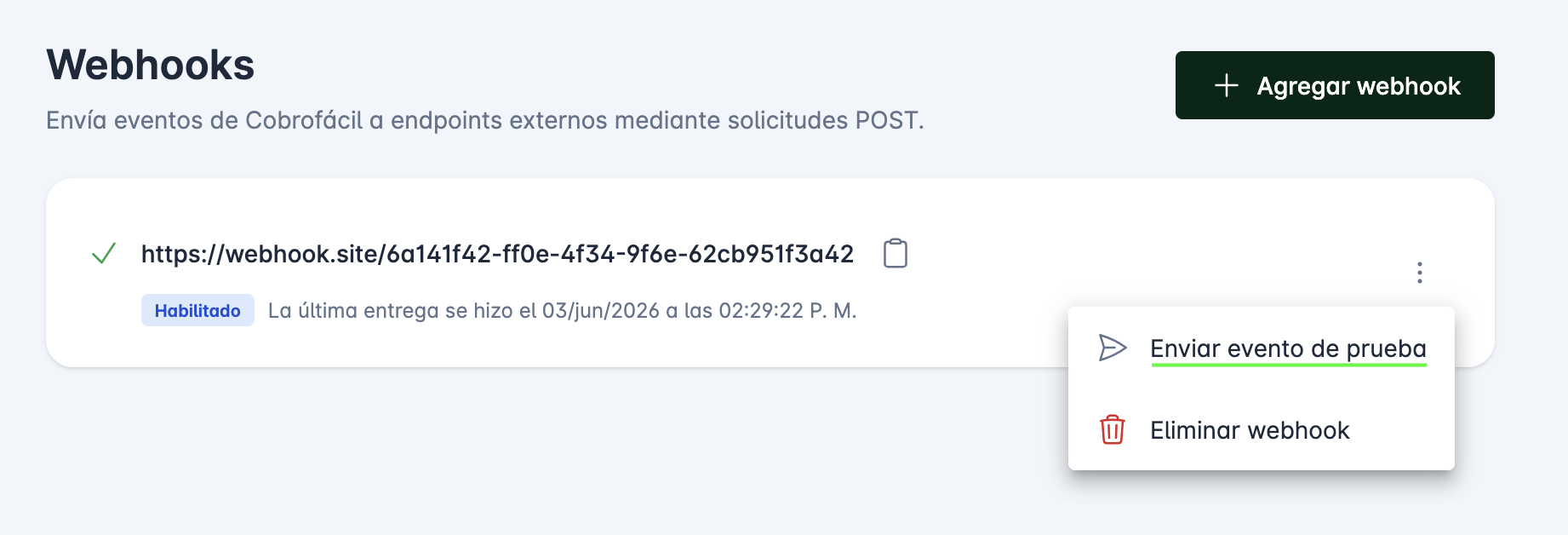
After a webhook has been created, the app shows recent deliveries. You can inspect the response status, response body, attempts, and redeliver a previous delivery.
Payload
Each webhook request is sent as application/json with this structure:
- Name
id- Type
- string
- Details
- required
- Description
Unique delivery group ID for the event. Retries for the same event use the same value.
- Name
event- Type
- string
- Details
- required
- Description
Event name, such as
webhook.pingorspei_transfer.reconciled.
- Name
created_at- Type
- string
- Details
- required
- Description
ISO 8601 timestamp for when Cobrofácil created the webhook payload.
- Name
data- Type
- object
- Details
- required
- Description
Event-specific data. For
webhook.ping, this is an empty object.
Example webhook payload
{
  "id": "f745dd90-4e4f-11f1-868c-710e65f6348b",
  "event": "spei_transfer.reconciled",
  "created_at": "2026-05-26T18:42:15.000000Z",
  "data": {
    "id": "01HZY0Q7J3S2K6V77E9B8F3V2M",
    "tracking_id": "TEST-WEBHOOK-12345678",
    "provider_id": 123456,
    "order_type": "outgoing",
    "status": "reconciled",
    "clearing_date": "2026-05-26T18:32:15.000000Z",
    "reconciled_date": "2026-05-26T18:42:15.000000Z",
    "capturing_date": null,
    "numeric_reference": 1234567,
    "sender_bank_id": 90646,
    "recipient_bank_id": 40012,
    "sender_clabe": "646180630700000001",
    "recipient_clabe": "012345678901234568",
    "sender_name": "STP",
    "concept": "SPEI webhook reconciliation test",
    "cep_url": "https://www.banxico.org.mx/cep/..."
  }
}
Respond with any 2xx status code to mark the delivery as successful. Non-2xx responses, timeouts, and connection failures are treated as failed attempts.
Event types
These are the currently supported outbound webhook event names.
See the webhook event reference for generated payload schemas and examples.
- Name
webhook.ping- Description
Test event sent when you manually send a ping from the webhook menu. The
dataobject is empty.
- Name
spei_transfer.reconciled- Description
Sent when an outgoing SPEI transfer moves from cleared to reconciled. The
dataobject contains the SPEI transfer fields shown above.
Delivery attempts
Normal event deliveries are retried automatically. Cobrofácil makes the first delivery attempt and up to six retries. Retries use a fixed delay between attempts. Test pings use a single attempt.
Recent deliveries in the app include:
- Name
event_name- Type
- string
- Description
The event name delivered to your endpoint.
- Name
request_headers- Type
- object
- Description
Headers sent to your endpoint, including
Content-Type,Timestamp, andSignature.
- Name
payload- Type
- object
- Description
The JSON payload sent to your endpoint.
- Name
response_status_code- Type
- integer
- Description
HTTP status code returned by your endpoint, when available.
- Name
response_body- Type
- string
- Description
Response body returned by your endpoint, or the delivery error message.
- Name
attempt_number- Type
- integer
- Description
Retry attempt number. The first delivery has no retry attempt number.
- Name
max_attempts- Type
- integer
- Description
Maximum retry attempts for that delivery.
- Name
succeeded- Type
- boolean
- Description
Whether the delivery attempt received a successful response.
Security
Cobrofácil signs each webhook request with the webhook signing secret. The signature is sent in the Signature header and is an HMAC SHA-256 hash of the JSON request body.
Cobrofácil also sends a Timestamp header. Use it to reject stale requests in your application if you want replay protection.
Verifying a request
import crypto from 'node:crypto'

const signature = req.headers['signature']
const expected = crypto
  .createHmac('sha256', webhookSecret)
  .update(rawRequestBody)
  .digest('hex')

if (!crypto.timingSafeEqual(Buffer.from(expected), Buffer.from(signature))) {
  throw new Error('Invalid webhook signature')
}
Use the raw request body for verification. Re-serializing parsed JSON can change whitespace or key order and produce a different hash.